Pair the Alphard Golf app
Install the Alphard Golf app and pair it with your Fusion to unlock firmware updates, a backup controller, and wheel alignment adjustment.
- Firmware updates — keep your Fusion running the latest software.
- Backup controller — drive the cart from your phone if the controller is ever unavailable.
- Alignment adjustment — fine-tune the cart so it tracks straight.
See how the in-app alignment adjustment works — fine-tune the cart from your phone so it tracks perfectly straight.
WHEEL ALIGNMENT (APP)
Quick Start Video
Watch the full walkthrough, or tap a chapter dot on the bar — or open the chapter menu below — to jump straight to a step.
Unfold & Set Up
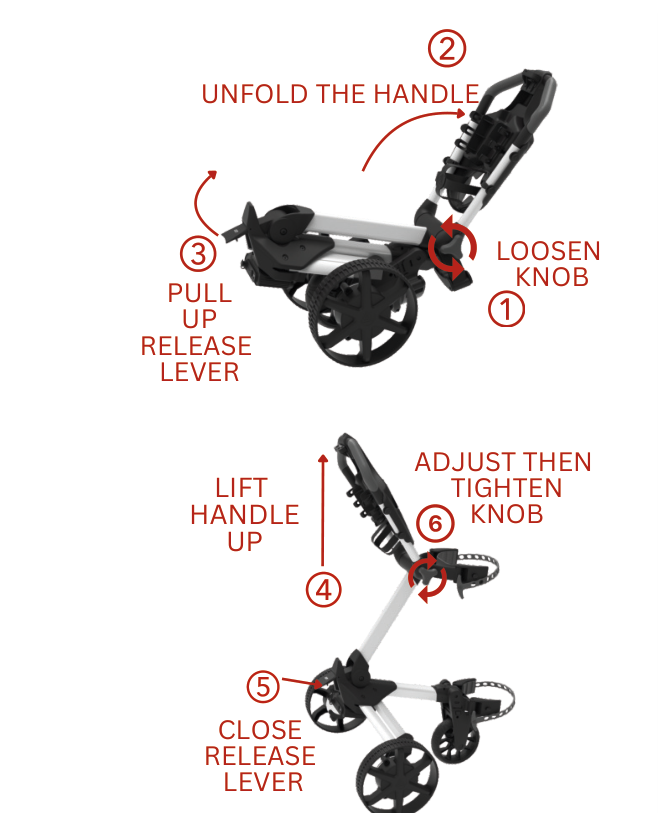
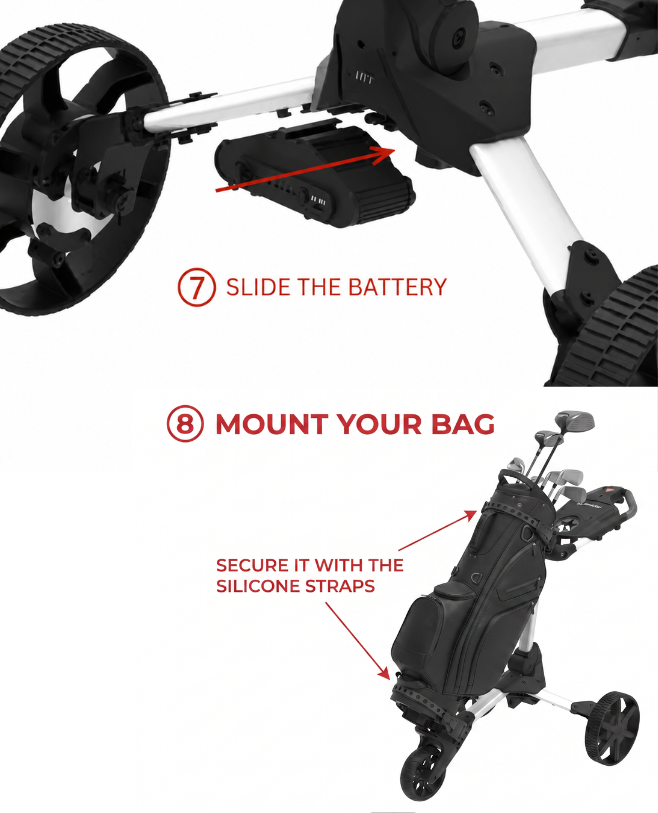
UNFOLD & SET UP
INSERT THE BATTERY
MOUNT YOUR BAG
INSTALL THE BAG RISER
Folding After Use
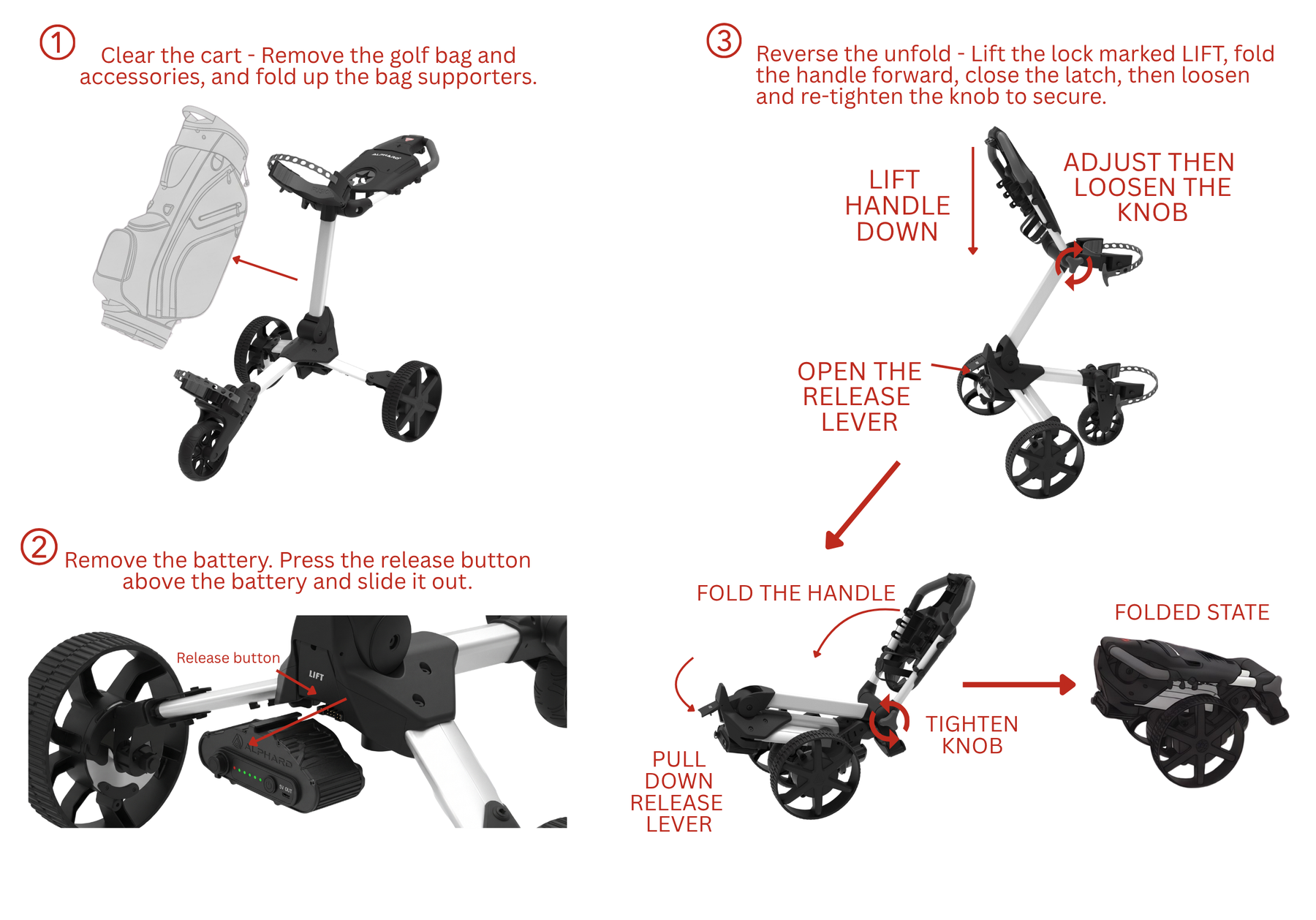
FOLD THE CART
REMOVE THE BATTERY
REMOVE THE BAG RISER
Using the Controller
Forward / Speed up
Each press of the Up button raises the speed by one of ten levels.
Slow down
Each press of the Down button lowers the speed by one level.
Stop / Brake
Press Stop to bring the cart to a halt immediately at any speed.
Reverse
From a complete stop, hold the Down button to reverse. Release to stop.
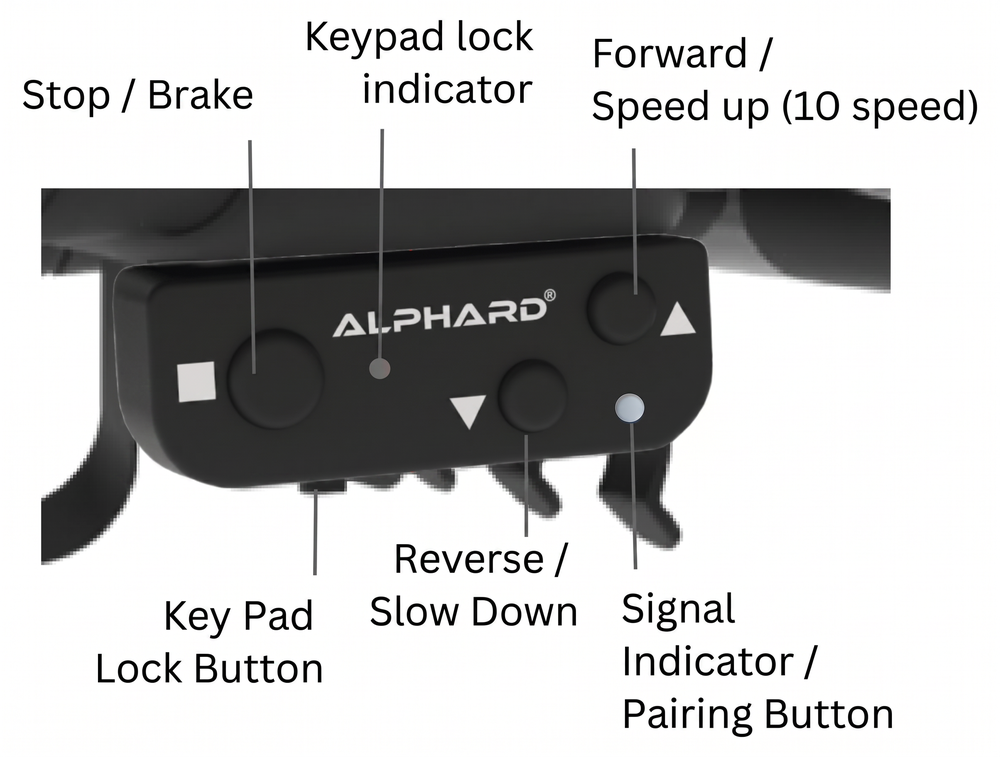
PAIR THE CONTROLLER
KEYPAD LOCK
Charging
Battery
Charge at least 5 hours before first use. A full charge takes about 4 hours and lasts up to 27 holes. Recharge after about every 18 holes, and use only the included charger.
Controller
About 1 hour or less using the supplied USB-A to Type-C cable. We recommend recharging it after every round.
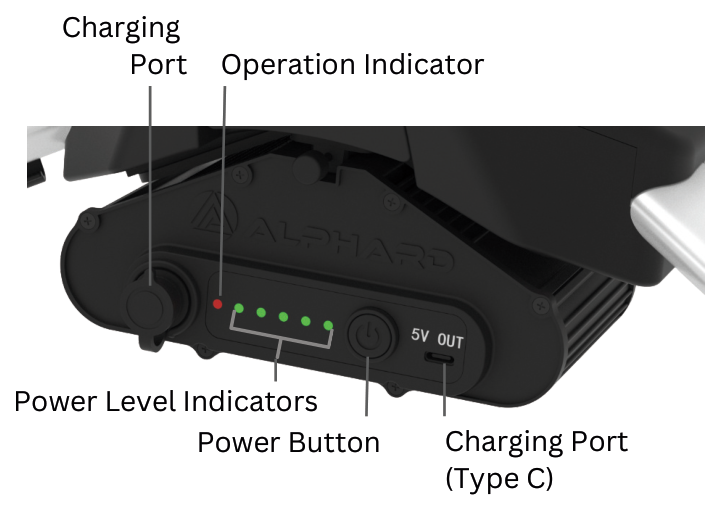
Good to know: the power unit has a 5V USB-C output for emergencies. If the controller runs low, use the included USB-C to USB-C connector to top it up from the battery in a pinch — it can also charge a phone slowly. It does not charge the battery itself.
CHARGE THE BATTERY
CHARGE THE CONTROLLER
USB-C TO USB-C CONNECTOR
Features & Good to Know
Going downhill the cart may pick up a little speed, but it stays capped at the speed level you set, so it never runs away from you.
Turn off the battery or hold the STOP button to switch into freewheel mode and use Fusion as a regular manual push cart.
Fusion does not use anti-tip bars — as a power-assist cart, just keep a hand on the handle to steer, which keeps it stable on slopes.
The bag support has silicone pads that protect both your bag and the cart from scratches.
The smart charger prevents overcharging, so you can leave it charging without worry.
A magnetic spot on the console that holds your ball marker, so it's easy to grab when you reach the green.
A small button underneath the controller locks the keypad to stop accidental presses while you hold it — it is a key lock, not an anti-theft lock.
The controller works from about 5 yards away. We don't recommend using it as an everyday remote — Fusion is designed as a power-assist cart that you steer by hand.
Accessories & Onboard Features
Bag Riser
For smaller or stand bags — drop it in once to close the gap so the bag sits securely. Leave it in place; you don't need to remove it before folding. Standard cart bags don't need it.
Umbrella Holder
Non-adjustable mount on the frame to keep you covered through the round.
Adjustable Handle
Set the handle to a comfortable height, then tighten the knob.
Console Storage
Onboard storage with a built-in scorecard holder and pencil holder.
Built-in Cupholder
Built-in cupholder integrated into the console — keeps your drink within reach.
Magnetic Ball Marker Pad
The magnetic landing pad is for the ball marker only.
INSTALL UMBRELLA HOLDER
SECURE THE UMBRELLA
STORE UMBRELLA HOLDER
CUP HOLDER
BALL MARKER PAD
CONSOLE STORAGE
Troubleshooting
| Issue | Possible cause | Solution |
|---|---|---|
| Cart won't power on | Battery not seated or not charged | Remove and re-insert the battery firmly until it clicks. Make sure it's fully charged. |
| Controller won't connect | Pairing lost after a reset | Re-pair the controller: press the signal / pairing button on the controller (a pen tip helps) until the blue light flashes, then turn on the battery to pair. |
| Cart rolls back slightly on a slope | Automatic parking brake holding position | This is normal — the motor counters the downhill force. Park perpendicular to the slope to save battery. |
| Controller not responding mid-round | Controller fault, flat battery, or lost pairing | Use the Alphard Golf app as a backup controller to keep playing, then re-pair or recharge the controller after your round. |
| Cart pulls to one side, drives in a circle, or one wheel won't turn | Motor or cable fault on one wheel | Contact us at contact@alphardgolf.com. We'll guide you through a quick wire-swap check — swapping the two motor cables shows whether the fault is in the cable or the wheel motor. Watch the wire-swap test below to pinpoint the cause. |
Wheel going in a circle or seizing up? This wire-swap test pinpoints whether the problem is the wheel motor or the control box. It involves opening the control box — if you'd rather not, email contact@alphardgolf.com and we'll help.
WIRE-SWAPPING TEST — MOTOR OR CONTROL BOX?
System Light Guide
Match the lights on your battery and controller to the guides below.
Battery Light Guide

| # | Indicator | Light | Status | What it means |
|---|---|---|---|---|
| 1 | Operation | Solid red | Battery is on and ready — begin your round. | |
| 1 | Operation | Flashing red | Charging in progress — shows while the charger is plugged into the battery. | |
| 2 | Power Level | Green | Shows the charge level. Five green lights means over 80% — close to full. |
Controller Light Guide

| # | Indicator | Light | Status | What it means |
|---|---|---|---|---|
| 3 | Signal | Solid blue | A button is being pressed — the controller is transmitting. | |
| 3 | Pairing | Blinking blue | Pairing mode is active (triggered by the signal / pairing button). | |
| 4 | Keypad Lock | Flashing red | The keypad is locked. Press the button underneath the controller to unlock. | |
| Charging | Solid red | The controller is charging. | ||
| Charged | Solid green | The controller has finished charging. |
Safety & Maintenance
General safety
Don't overload the cart. Keep hands and fingers away from folding joints and moving parts. No passengers or unusually heavy items. Inspect the wheels, locks, and frame before each use.
Terrain & weather
Avoid steep slopes; keep both hands on the handle when climbing to prevent tip-over. Keep electronics dry and avoid heavy rain. Store in a cool, dry place. Stop use immediately if you notice abnormal noise or damage.
Specifications
| Item | Value |
|---|---|
| Unfolded (L × W × H) | 48.8 × 29.3 × 41.0 in (124 × 74.4 × 104.1 cm) |
| Folded (L × W × H) | 20.6 × 15.2 × 19.3 in (52.3 × 38.6 × 49 cm) |
| Weight (with battery) | 31.8 lbs / 14.43 kg |
| Battery weight | 2.3 lbs / 1.05 kg |
| Weight without battery | 29.5 lbs / 13.38 kg |
| Battery | Lithium-ion · 37V · 5.0Ah (185Wh) · 42V max · up to 27 holes per charge |
| Charger | AC/DC Smart Charger · 100–240VAC in · 42.0VDC 1.5A out · indoor use only |
| Motors | Dual brushless quiet motors |
| Controller | 10-speed detachable · range about 5 yd |
| Frame | Lightweight 6061 aluminum |
| Max tested load | 25 kg |
| Warranty | 2 years |


Common Questions
How long should I charge the battery before the first round?
How far does it go on a charge?
What is the Bag Riser for?
Do I need to remove the battery before folding?
Can I use the controller as a full remote?
Register your warranty
Register your Fusion to activate your 2-year warranty and get faster support if you ever need it.